+86-18050089566(WhatsApp/wechat)
+86-18050089566(WhatsApp/wechat)


Time:2026-10-23 Views:837
An aiming light on a barcode scanner module reads nothing. It is a human interface: a visible mark that tells the operator or the mount where the reading window is pointed, while the illuminator and the decoder inside the module do the actual work. A crosshair laser beats a plain LED aim light on exactly the two jobs that mark has to do. First, a small cross tells you where the center of the field of view is and how it is rotated, so you can put the label under it instead of guessing — and when several codes sit in front of the reader at once, it tells you which one you are about to take rather than leaving it to chance. Second, a laser pattern stays tight and visible at a much longer presentation distance than an LED spot, which is what makes a fixed or embedded module usable across a gate, a counter, or a parking lane. The trade is cost, a laser-safety line in your documentation, and one failure mode worth designing around: the sight line and the optical axis are not the same line, so the cross lands exactly on the code only at the distances the optics were calibrated for.
In short:
Every 2D imaging module has a field of view — a cone, widening with distance, out of the window. Inside that cone sits the illuminator, usually white or red LEDs behind a diffuser, and the image sensor. The label has to be inside the cone, at a distance the depth of field allows, with enough print quality and enough contrast for the decoder. None of that requires a visible light aimed at the label. The module can decode a code in total darkness as far as the aimer is concerned.
What the operator cannot do is see a cone. On a countertop scanner with a window you can point, they learn the geometry by feel. On an embedded module — one set into a kiosk bezel, a turnstile, a self-checkout plenum, a fixed mount over a conveyor — nobody can see where the window is looking, and the person placing the code is working from outside the machine. That is the entire reason an aiming indicator exists: it converts an invisible cone into a mark on the surface.
Once you accept that, the comparison between a crosshair laser and an LED aim light is a comparison between two ways of drawing that mark. One draws an outline of the field with orientation. The other draws a spot that says "near here".
An LED aim light is a point source behind a lens or a mask. It projects a bright spot, or in the cheapest form a general red glow across a region. Its edges are soft, and because the LED is not collimated, the spot grows quickly as distance increases — it fades at the same rate it grows, so within a short distance there is nothing left to see against a lit environment.
A crosshair is two thin laser lines at right angles, produced by a single laser diode through a diffractive or cylindrical-lens optic. The crossing point is placed to represent the center of the field of view, and the arms of the cross indicate the orientation of the field, so a rotated label is visibly rotated against the cross rather than just being somewhere in a glow. Thin lines hold their width across distance far better than a spreading spot holds its edge, and coherent light survives ambient illumination that would wash out an LED.
The practical difference for the person at the machine is the difference between an instruction and a suggestion. The EDOO F41-35 page puts it as a working condition rather than a feature: Even in bright sunlight, it can provide clear laser cross aiming to ensure accurate barcode scanning. The F43-MRZ page frames the same hardware under its own heading, High Brightness Laser Cross Aiming, and states what it buys: the sight which can clearly aim to the barcode even in direct sunlight.
The first benefit is the one operators feel in the first minute. With a dot, the user learns that the dot must be "on the label", and then discovers that a dot with soft edges on a large label, or near its edge, puts part or all of the symbol outside the cone. With a cross, the user is told where the middle is, and the arms show whether the label sits square in the field. Alignment becomes a two-second act — slide the code until the cross is in its middle — instead of a small trial-and-error loop of wave-and-retry that costs time on every scan and shows up as a complaint about the reader.
The stronger version of this argument appears when more than one code is in the field, which is the normal condition in most real deployments:
In a single-code, well-controlled presentation — one label, one operator, a fixed stand — a dot is adequate. In a multi-code field, a dot means the wrong product number, the wrong parcel, or the wrong passenger's ticket enters the system, and the error is silent because the scan beeped successfully. A cross that marks the center of the field lets the operator place the intended symbol on the crossing point, and it makes the intent auditable by anyone standing next to them: the cross is on this label.
This is also the argument for the crosshair on a mount rather than a handheld. A hand-held operator compensates for a poor sight with practice. A fixed mount has no one in the loop.
The M2 mini module page frames the same benefit from the integrator's side: highly visible laser aimer to achieve easy and accurate targeting — targeting, not decoding.
The second benefit is range, and it is the reason crosshair sights appear on the long-distance end of the family rather than on countertop readers.
A collimated beam diverges little, so the cross remains thin and the crossing point remains locally bright as distance grows. An LED spot spreads and dims roughly together, so its usable range is short and it competes badly with ambient light. That is a property of the light, not of the module — and it maps onto deployment: a self-service gate where the user stands back, a drive-through window, a parking lane where the code is on a car windscreen, a conveyor read from above, or a wall-mounted reader at a loading bay.
The F41-ER kiosk module states the coupling directly: To meet the requirement of long-distance code reading, clear laser aiming with red cross, and it draws the same conclusion for outdoor use — clear laser aiming with red cross, suitable outdoors. MF31 is the long-distance member of the module family, Designed for parking lots, and a parking-lot read is exactly the geometry where a sight you cannot see is a sight you cannot use.
One honest caveat belongs next to this claim, because a hostile reader will find it: the aimer's reach and the decoder's reach are not the same number. Depth of view sets the distance band in which the module can resolve a symbol at a given size and print quality, and it is set by the optics, the sensor and the lighting on the label — not by the sight. A crosshair visible at five metres on a small label does not make that label decodable there. What the longer-throw pattern buys is that within the module's working band, the operator can actually use the whole band, including the far end of it, instead of crowding in close because that is the only place they can see where to aim.
The sight line and the optical axis come out of two different apertures, separated by a few centimetres on the module's face. Because they are not coaxial, the cross is not on the true field center at every distance. It is placed correctly at the near calibration distance and at the far one, and it drifts between them — parallax, the same effect that makes a iron-sight rifle hold off. The offset direction depends on the geometry of the two apertures, and it grows with the angle.
Three consequences for anyone specifying a module:
Nothing here argues against the crosshair. It argues for aligning the machine once, at the distances it will actually work at, and then leaving it alone.
Embedded 2D barcode modules ship in three aiming configurations, and the difference between them is a real specification line, not a styling choice.
| Aiming option | What it gives the operator | Where it belongs | A published EDOO line to compare against |
|---|---|---|---|
| No aiming indicator | Nothing — the user learns the window by trial | Kiosks and turnstiles where the code is presented at one fixed place, and the mount was aligned once at build | MF61, MF46 ,MF21,MF22 an so on. |
| LED aim light or spot | "Somewhere near here", at short range, in controlled light | Countertop and desktop presentations, low-cost devices, short fixed distances | ME22 ,ME11 ,M0,spec row reads Red LED (625nm) |
| Crosshair laser | Field center plus orientation, visible at distance and in sunlight | Long-distance reads, gates, conveyors, outdoor and parcel work, multi-code fields | Clear Aiming Mode — E5; High Brightness Laser Cross Aiming — F43-MRZ; the E130 table carries a Laser Safety Class row whose value is Class 2 |
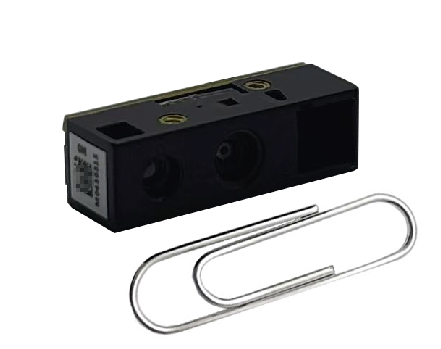
Within EDOO's embedded range, the crosshair sight is the aiming arrangement on the M2A, E60 and E70 modules. Those three are named here as the manufacturer's own part designations and nothing more than that: what the sight is on them, and nothing about their optics, interfaces or working distance is being inferred from the name. Ask for the datasheet for each one — an aiming arrangement is a specification line you should confirm in writing the same way you confirm a cable.
The published pages in the same component family show how the option is spread across a range rather than fixed at one price point, and they are the wording to quote in an enquiry:
Clear Aiming Mode heading; the F41-35 and F43-MRZ pages both say the cross stays readable in sunlight, and the F41-ER page ties its red cross directly to long-distance reading and outdoor use. The E130 spec table is the one that publishes the consequence for your paperwork — Laser Safety Class against Class 2.highly visible laser aimer to achieve easy and accurate targeting.Adopt LED aiming light to help aim codes, and the W20-60 handheld row reads Red LED (625nm).The MF51 does not provide an aiming indicator — MF51, which is a legitimate answer when the mount does the aiming.If your design needs a specific one of these — a crosshair on the M2A, an E60 or E70 sample, an LED sight swapped onto a housing you already tooled — that goes in the enquiry with the model name, and the documentation and ODM / OEM channels are where the datasheets and the modification conversation live.
| Dimension | Crosshair laser | LED aim light |
|---|---|---|
| What the mark represents | Field center and field rotation | A region near the field center |
| Usable in a multi-code field | Yes — the operator can select the intended symbol | Weak — the choice is left to the decoder |
| Visibility as distance grows | Holds; thin lines stay thin | Falls off quickly; the spot spreads and dims |
| Visibility under direct sunlight | EDOO pages claim it for the crosshair family, in those words | Generally lost |
| Power and heat on the module | One diode plus driver, modest | One LED plus driver, modest |
| Documentation the integrator inherits | A laser class line to carry into the product — the E130 page states Class 2 under Laser Safety Class | None specific to the aimer |
| Failure mode | Parallax between sight and optics; glare on reflective surfaces | Ambiguity: the mark is on, the code is not |
| Typical symptom when it is the wrong choice | Operator trusts the cross at an uncalibrated distance and misses | Silent misreads when two codes are in view |
Because the aim light lives on the module and not on the housing, four questions decide whether it works in your product, and they are all worth putting in writing to the supplier before you order.
Is the sight driven by the module or by your board? On some modules the aiming laser fires continuously while powered; on others it follows a trigger or a decode cycle. If your enclosure has no button, a continuously-on laser is what your users will see, and your power budget has to carry it.
Which aperture, and at what angle? The window you cut in a bezel has to clear both the optics and the aiming aperture. A sight that is partially blocked by a bezel lip is worse than no sight, because it looks correct and lies.
What is the laser class, and what does that oblige you to print? The E130 fixed-mount page publishes the row Laser Safety Class with the value Class 2, which is the class treated as safe for inadvertent brief naked-eye viewing under the IEC 60825-1 classification. Classify your finished product from the module's data rather than assuming the module's class becomes your device's class, and ask for the report with the sample — the documentation channel is at Product documentation.
What does it do on a screen? Payment and loyalty codes are increasingly presented on phones. Red illumination and red aiming compete with a display that is already bright, and glare from the glass can bury the symbol. Fixed-mount readers intended for on-screen codes are built around diffused or polarised illumination — the E130 table carries Light-source Front Cover options for exactly this — so name the presentation in your enquiry instead of hoping the sight solves it.
If the module is being modified for your product rather than bought as it is — window geometry, cable, firmware behavior, an aimer your industrial design can hide — that is an ODM conversation, and it is covered under ODM / OEM services.
A crosshair is not the default correct choice, and saying so is part of specifying it well.
Between the two extremes sits the middle case most designers actually have: a handheld or wearable where an operator aims, but at a fixed short distance indoors. There, an LED spot is enough — which is why the handheld barcode scanner and desktop scanner families carry LED aim lights and the fixed-mount and long-distance families carry crosses. The pattern follows the geometry, not the price tier.
If you are comparing two modules, or checking a sample against a datasheet, this is enough to decide it. You need the module on a harness, a host that prints the decoded string, and a printed sheet carrying several different codes side by side.
Write the step-3 offset and the step-4 result into your acceptance record. Those two numbers are what tell you whether the sight on this module can be trusted at the distance your product will work at.
Does the aiming light affect whether a barcode scanner module reads the code? No. The aiming light is an alignment aid for the person or the mount; decoding is done by the illuminator, the optics and the decoder. A module with no aiming indicator at all still reads every code its field of view and depth of band allow — the MF51 page says so in terms, The MF51 does not provide an aiming indicator. What the aimer changes is how reliably the right code ends up inside that field.
Why does a crosshair laser make multi-code scanning more accurate? Because it marks a point and an orientation instead of a region. With an LED spot, several symbols can sit plausibly "on the light" and the decoder returns whichever one it resolves first, with nothing to tell the operator that the choice was arbitrary. With a cross whose arms show the field's rotation, the operator can place one specific symbol on the crossing point, and anyone watching can confirm which symbol was intended.
Is a laser sight really usable at longer distances than an LED sight? Yes, as a light. A collimated laser line keeps its width and its local brightness as distance grows, while an LED spot spreads and dims together and vanishes in ambient light. That is why long-distance fixed-mount modules and outdoor parking or gate applications are the ones published with a crosshair — the F41-ER page ties its red cross directly to long-distance code reading, and MF31 is written for parking lots. The sight being visible is still not the same as the code being decodable at that distance; the module's depth of view decides that.
Why does the cross not land on the code at some distances? Because the aiming aperture and the optical axis are physically separate and not coaxial, so the cross is aligned to the field center at the calibration distances and drifts between them by parallax. This is normal for the class of device, and it is why an acceptance test should measure the offset at a middle distance instead of only at the near and far ends.
What does Class 2 mean on a module's data sheet? It is the laser classification, under the IEC 60825-1 scheme, that is treated as safe for inadvertent brief viewing with the naked eye — the E130 page publishes Class 2 against its Laser Safety Class row. It describes the emitter as built, not your finished product: your enclosure, window and mounting geometry determine the classification you have to carry, so request the module's laser documentation and classify the assembly from it.
Which EDOO barcode scanner modules are supplied with a crosshair laser? The M2A, E60 and E70 embedded modules are built with crosshair laser aiming; EDOO publishes the same sight on other pages of the range in their own words — Clear Aiming Mode on the E5, High Brightness Laser Cross Aiming on the F43-MRZ, and a red cross tied to long-distance reading on the F41-ER. Other parts of the range deliberately use an LED sight or none, so treat the aiming arrangement as a line to confirm against the datasheet for the exact model you order rather than something the family name guarantees.
Can a crosshair be added to an embedded 2D module after the design is frozen? Usually not as a bolt-on. The optic, the driver and the aperture sit on the module's board and are aligned at manufacture, and the bezel has to clear the second aperture. Retrofitting one means adding a sight to the housing and aligning it yourself, which reintroduces exactly the offset problem you were trying to remove. Specifying the aimer at module selection time is the cheap version of this decision; if you need it changed on an existing module, start with OEM / ODM services.
Three families of EDOO hardware publish their aiming arrangement on the product page, and the wording is the fastest way to compare them: the barcode scan engine and embedded module family, the fixed mount barcode scanner family where crosshair sights are the norm, and the industrial fixed-mount readers used over conveyors and dock doors. Name the presentation distance, the lighting and whether more than one code can be in view at once, and the right sight — or no sight at all — falls out of the geometry rather than the catalogue.
Send those three answers, plus the code types and the interface your host speaks, to chenzg@edoo-iot.com and engineering will match a module to them.
F41-ER fixed-mount scanner · ED-2004-EX05 fixed-mount scanner · M2 mini dual-CPU scan module · MF31 long-distance scan module · E5 passport MRZ scan module · W20-60 handheld scanner · F41-35 fixed-mount passport scanner · F43-MRZ passport reader · MF51 fixed scanner · E130 fixed-mount scanner · Barcode scan engines · Fixed mount barcode scanners · Industrial fixed-mount readers · Handheld barcode scanners · Desktop barcode scanners · Product documentation and SDKs · ODM / OEM services
About

Products
Solutions
Support
News